Note: No affiliate links and no sponsors in this post. Both files, the video, and the session logs are from one afternoon of my own testing on July 25, 2026.
Anthropic shipped Opus 5 this week. Fable 5, its other current flagship, has been out since June, and you switch between them by changing one word in a command. So I handed both the same job, read from the same file, in the same minute, and changed nothing but the model name.
Left: Opus 5. Right: Fable 5. Twelve seconds, unedited, both games playing themselves. Turn your sound on — neither model was given a single audio file, so every beep was built from scratch. (You're hearing the left side only; both at once was unlistenable.)
What I won't do is tell you which one looks or sounds better. I had one monitor and one pair of ears, and taste isn't data. Every claim below is something I timed, counted, or read in the file.
Here is what both of them were handed. It goes up front rather than in a footnote, because reading it is the only way you can check the "same prompt" part for yourself:
Create a single self-contained HTML file (ALL CSS and JavaScript inline — no external files, no CDN, no imports, no assets) that renders a self-playing neon arcade brick-breaker on a full-screen
<canvas>.Critical: the game must start playing BY ITSELF the instant the page loads. No clicks, no key presses, no mouse input, no start screen. […]
SOUND: synthesize all audio at runtime with the Web Audio API (no audio files, no external assets). Distinct short blips for brick hit (pitch rising with the combo multiplier), paddle bounce, wall bounce, power-up pickup, and a small arpeggio flourish on level clear. […]
Between those sit a dozen bullets asking for exploding bricks, glowing ball trails, a combo multiplier, power-ups that split the ball, and a fresh level the instant the last brick falls. Nothing in it mentions a file size, a line count, or how much of anything to write.
The full prompt, every line of it
Create a single self-contained HTML file (ALL CSS and JavaScript inline — no external files, no CDN, no imports, no assets) that renders a self-playing neon arcade brick-breaker on a full-screen <canvas>.
Critical: the game must start playing BY ITSELF the instant the page loads. No clicks, no key presses, no mouse input, no start screen. The paddle is driven by the game's own AI and never misses in a way that ends the game — if a ball is lost, a new one launches immediately.
Requirements:
- Dark background with a vivid neon palette (cyan / magenta / lime / gold) and an additive glow feel.
- A grid of colored bricks. Every brick hit EXPLODES into a burst of particles and debris in that brick's color.
- The ball(s) leave a glowing motion trail; every impact triggers a short screen shake and a flash.
- Combo system: consecutive brick hits raise a multiplier, with floating score popups rising from each hit.
- Power-ups drop from destroyed bricks and split the ball into multiple balls (3+ balls on screen at once) for chaotic cascades.
- Fast pace: ball speed tuned so something visibly explodes roughly every half second — the screen should never be still.
- When all bricks are cleared, a new level with a different brick pattern regenerates instantly so the action never stops.
- Neon HUD showing score, combo multiplier, and level.
- SOUND: synthesize all audio at runtime with the Web Audio API (no audio files, no external assets). Distinct short blips for brick hit (pitch rising with the combo multiplier), paddle bounce, wall bounce, power-up pickup, and a small arpeggio flourish on level clear. Keep it clean and arcade-like, gently limited so overlapping hits never clip. Start the AudioContext on load and, because browsers may block autoplay, also resume it on the first user gesture or visibility change.
- Smooth 60fps animation using requestAnimationFrame, sized to the full viewport and responsive to window resize.
- Must run by simply opening the file in a browser — zero dependencies.
Output ONLY the complete HTML file content starting with <!DOCTYPE html>. No explanation, no markdown code fences.
Opus 5 came back with a game two and a half times bigger. The smaller one still burned 28% more tokens getting written. I'd have bet the other way, and I'd have lost.
The short version. Fable 5 checks its own work before it answers you. Opus 5 skips the checking, writes the whole thing in two passes, and spends the difference on features. If you're going to read what comes back, Opus 5 gives you more per token. If the output ships with nobody reading it, Fable 5's habit is the one you want. Everything below is the evidence. How I ran the test is at the bottom, if you want to check my work.
The smaller game cost 28% more tokens to write
A token is the unit these models read, write, and get billed in. One token is roughly three-quarters of an English word. These counts come straight from the session logs. None of them is an estimate.
| Opus 5 | Fable 5 | |
|---|---|---|
| Tokens written (the part billed for output) | 61,976 | 79,620 |
| Rounds of writing before handing over an answer | 2 | 5 |
| Times it stopped to run something and check itself | 0 | 2 |
| Start to finish, on the clock | 5m 25s | 6m 48s |
| Size of the finished game | 40,347 bytes | 15,577 bytes |
| Tokens spent per kilobyte of surviving code (lower is leaner) | 1,573 | 5,234 |
Fable 5 produced a file 61% smaller and spent 28% more tokens doing it. Per kilobyte of code that made it into the final answer, it spent 3.3 times as much.
The logs explain why. Nobody asked Fable 5 to check its work, but it did: it saved a draft, ran it through a checker that catches broken code before anyone opens it, and only then handed me the finished thing. The checking accounts for the two check-ins and three of the five rounds. Opus 5 ran nothing. It thought, it typed the whole game, it stopped.
So the size of the answer doesn't set the bill. Working habits do. A model that double-checks itself writes the thing twice. The second copy never shows up in the file you receive, only in the token count.
Now the two caveats I'd want if I were reading this.
The previous round came out the other way. I ran the same test one prompt version earlier, under the same conditions, and Opus 5 spent 45,058 tokens to Fable 5's 33,640. So the 28% is what happened on this run rather than a fixed trait of either model. One figure did hold across both rounds: tokens spent per kilobyte of finished code, where Opus 5 came out leaner each time (1,573 vs 5,234 here, 1,313 vs 2,278 before).
Some of those tokens are thinking rather than typing. These models reason internally before answering, and that reasoning counts toward the total. My logs record that it happened but not what was in it, so I can't split typing from thinking. The totals are real; the breakdown isn't available to me. I'm also not converting any of this to dollars, because I haven't confirmed the current per-model rates. I'm stopping at tokens.
What Opus 5 did with 25 extra kilobytes
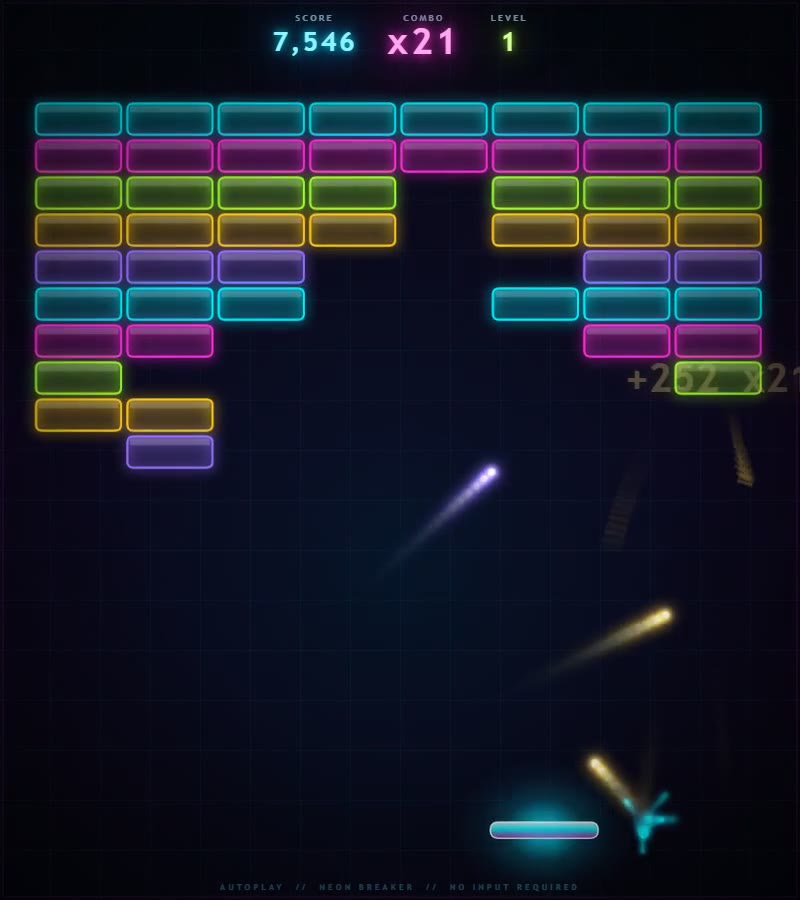
Opus 5's game, mid-run. The +252 floating over the wall is a 21-hit combo paying out.
Opus 5 wrote 40,347 bytes across 1,236 lines. Fable 5 wrote 15,577 across 412. Both files are self-contained, with no libraries and nothing downloaded, so every byte is something the model typed.
The obvious suspicion when one model writes 2.6 times more is padding. I read both files line by line, and that isn't it. Strip out blank lines and formatting and Opus 5's real working code is 2.39 times Fable 5's, which is the honest measure of the gap.
What the volume buys is features, about a dozen of them. The ones you can see or hear:
- Ten level layouts instead of five, plus bricks that take two hits to break.
- Seven sound effects instead of five, all generated from raw tones the browser produces on demand.
- A combo sound that climbs a scale. Both raise the pitch as you chain bricks, but Opus 5 snaps each step onto a five-note scale, so a streak walks up a little melody instead of sliding upward like a siren.
- Four guards against audio chaos, including a ceiling of 26 sounds at once and a cap of four brick sounds per redraw. Those guards are the difference between a satisfying rattle and a wall of noise when twenty bricks pop at the same instant.
For the curious: three ways to measure "more code," and which one to trust
Counting raw bytes gives 2.59x. Counting the finished code as tokens gives 1.99x. Counting lines gives 3.0x. I trust the stripped-code figure of 2.39x, blank lines and formatting removed, because it's the only one that ignores how the model chose to space things out. The 3.0x line count is the least meaningful of the three, and it's the number people quote most.
In this case, the extra code really did buy more game.
Sixty seconds each, and nothing moved
I left both games running for a full minute with a script watching them, and resized the browser window partway through. I was waiting for one of them to crack. Neither did.
Opus 5 went from 60.1 to 60.0 frames per second between the first stretch and the last. Fable 5 went from 60.0 to 60.1. Memory in both started at 9.5 MB and ended at 9.5 MB. Neither tab printed a single error, and both kept animating after the resize. Call it a draw — with the caveat that Chrome reports memory in coarse steps, so "no leak" here means no leak big enough for Chrome to notice in sixty seconds.
For the curious: what frame rate and memory actually tell you
Frame rate is how many times per second the game redraws itself. Sixty is the browser's normal ceiling, and a slow slide downward over a minute is the usual sign that something is quietly eating memory. Each redraw has more work to do than the last. Flat frame rate plus flat memory across sixty seconds rules out the fast, obvious failures. A slow drip over an hour would not show up in a test this short, and I didn't run one.
The only bug in either file is in the bigger one
On a 144Hz gaming monitor, the white flash on a freshly hit brick vanishes about 2.4 times faster than intended. That's it. One line, purely cosmetic, and the only place in 1,648 lines across both files where the hardware you happen to own changes what you see. And it's in Opus 5's file, the one that got everything else right.
For the curious: why the flash fades faster on some screens
Both files tie motion to elapsed time. That standard trick, usually called delta-time, keeps a game running at the same speed on a slow laptop and a fast desktop. Both got it right everywhere except that one line in Opus 5, where the flash fades by a fixed amount per redraw rather than per fraction of a second. Most monitors redraw 60 times a second; gaming monitors do it 144 times, so the flash burns through its fade 2.4 times quicker. Everything else in the file scales correctly.
Three places where file size predicted the wrong thing
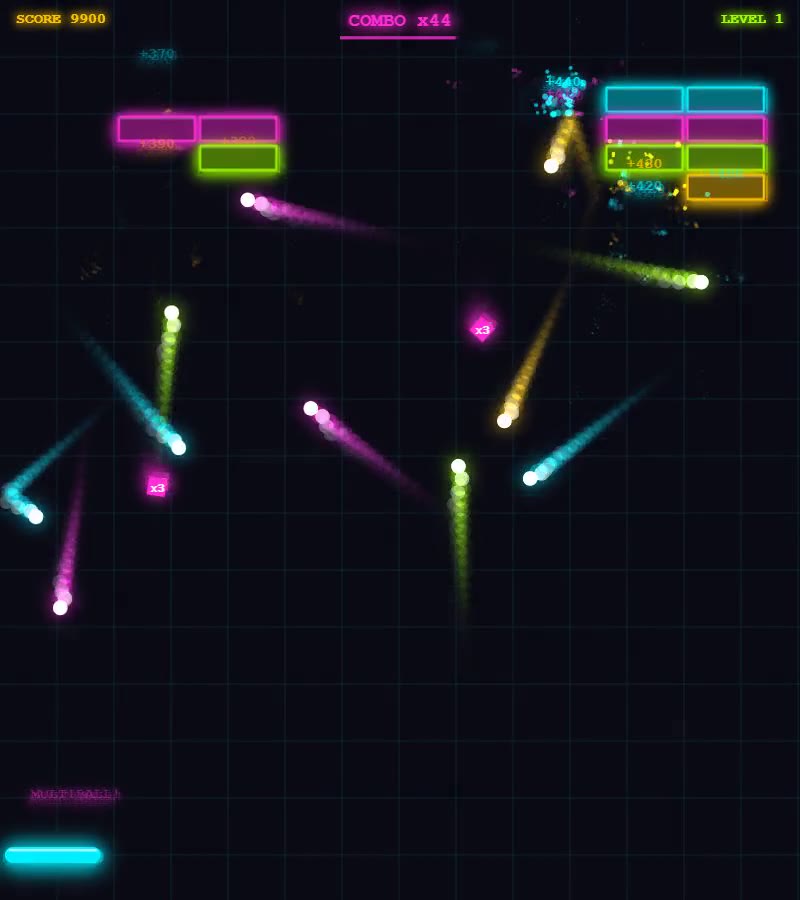
Fable 5's game, mid-run, with 16 kilobytes of code and a screen full of balls.
The bigger file didn't win everything.
Resizing the window. Fable 5 recalculates the brick layout and lets your game continue. Opus 5, if the resize changes its grid, throws the level away and builds a new one mid-game. Opus 5 also redraws ten stored brick images every time the window twitches. Smaller file, better behavior.
Surviving a hiccup. If something inside Opus 5's game breaks for a single frame, the game comes back around anyway. If the same thing happens inside Fable 5's, the screen stops for good. Neither broke in my sixty-second run, so this is a difference I read rather than a failure I watched. But it's the kind that decides whether a rare glitch is a blink or a black screen.
For the curious: one line's worth of difference
A browser game asks for its next redraw by scheduling one. Opus 5 schedules the next frame on the very first line of its loop, before any of the game logic runs, so a crash further down still leaves a frame already booked. Fable 5 schedules it on the last line, after everything else, so an error anywhere above it means the request is never made and the loop ends there. Same loop, opposite failure mode, and it costs nothing to get right.
And one theory I had to throw out. Fable 5 checks every brick on every redraw, while Opus 5 keeps a map. I was fairly confident that blunter collision code would show up as a speed penalty. It doesn't. At its worst, Fable 5's check ate 0.18% of the time a single frame gets; Opus 5's ate 0.04%. Both are noise. I'm leaving the wrong guess in, because "the naive one must be slower" is the sort of thing repeated as fact by people who never timed it, and for one afternoon that person was me.
For the curious: the actual collision timings
Worst case measured, Fable 5's brick check took 29.3 microseconds per redraw and Opus 5's took 6.9. A microsecond is a thousandth of a millisecond, and a game running at 60 frames per second gets 16.7 milliseconds to do everything in one redraw. That's where the 0.18% and 0.04% come from. The brute-force approach only starts to matter at brick counts far beyond anything either model built.
So which one should you use?
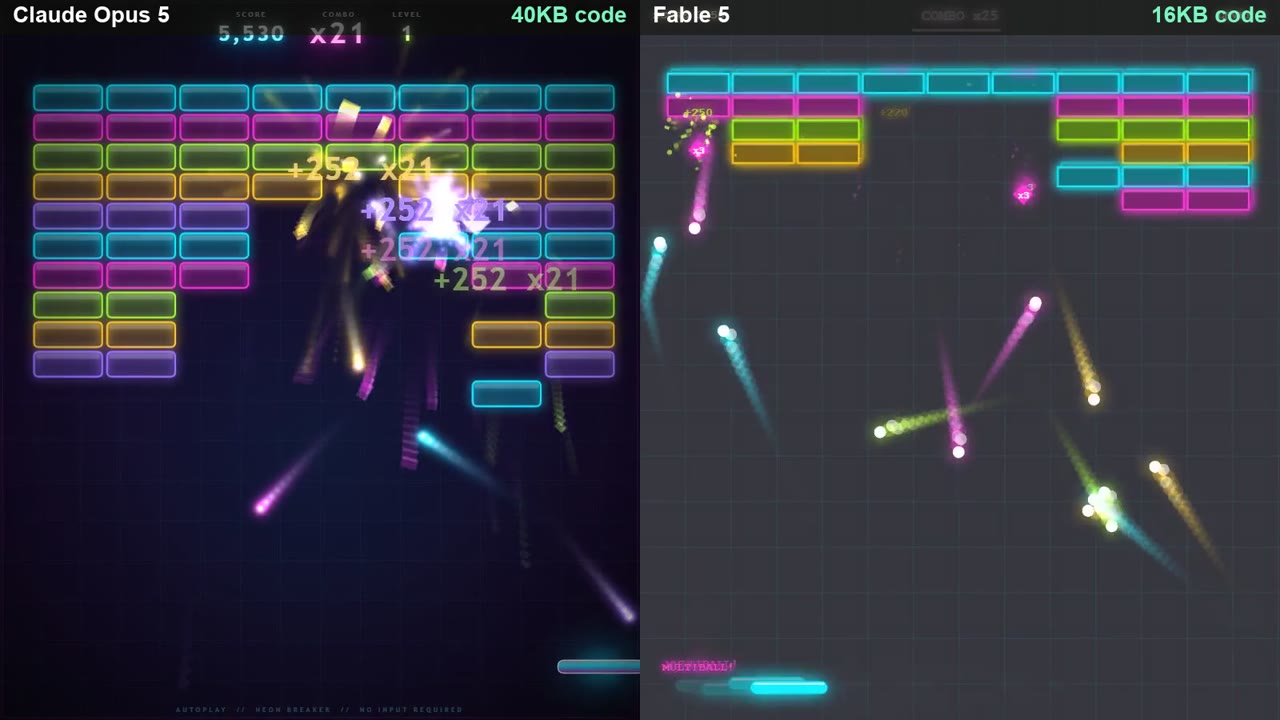
The same second, both games. 40 kilobytes on the left, 16 on the right, and the 16 cost more to write.
Three lines, based only on what I measured.
- If you read and review the code you get back: Opus 5. You're already doing the checking, so paying a model to check itself is paying twice. Opus 5's tokens-per-kilobyte was leaner in both rounds I ran.
- If the output ships without anyone reading it: Fable 5. The self-checking loop is why it cost more, and it's worth more than the tokens when nobody downstream is looking.
- If you want the most features per request: Opus 5, by roughly 2.4 times the working code. But budget a review pass, because the one bug in this whole test was in its file.
This was one build and one task, run once on each model, so the numbers describe this test rather than settle anything about the models in general.
File size told me the least of anything I measured. The bigger file had more features, the only real bug, and the worse behavior when I resized the window.
How I tested
Most model comparisons fall apart before they start, because the two prompts were never really the same prompt. So I made this one as dull as I could.
One prompt file sat on disk, the one quoted at the top, and both runs read it. I checked its fingerprint, the md5 hash, which is a short code that changes the moment you edit a single character. Both runs reported the same one (b282966a…). Same command, same folder, same minute; the only difference between the two command lines was the model name. No project instruction file sat in that folder, so neither model got house rules the other never saw. Neither got help from me: no follow-ups, no "make it better," no second try. Both returned a complete, properly finished page, so I'm not comparing a full answer against a truncated one. And the prompt banned borrowed code, which is what makes the file sizes honest.
What I could not control is worth saying plainly. I ran each model once, so I have no idea how much these numbers move between runs, and the 28% gap could sit inside that spread. The task is also a brick-breaker game with Web Audio, which is one of the most common tutorial projects on the web, so a model that has seen more of them may be recalling a familiar shape rather than reasoning harder about mine. Nothing in this test separates those two explanations. Read the gap as one afternoon's measurement, not as a property of either model.
If you want to repeat this: keep the prompt in a file and check its fingerprint instead of retyping it, save the session logs so token counts come from the record rather than your memory, and let the thing run for a full minute before you decide anything. The first two cost a minute each. The third is what changed my mind.