Note: No affiliate links and no sponsor on this one. Every screen below is from my own account, and I've marked the places where I couldn't confirm something.
Google's own help page lists AI deck generation in Slides as a Business Standard or Google AI Pro feature. My account is a free personal one, and on August 3 it built me a three-slide deck about pour-over coffee anyway. The first prompt failed outright. Gemini answered that it couldn't help with that request and asked me what topic I wanted, and I ended up with zero slides. The second prompt worked, and from the moment I clicked Next to the line "Your slides are ready" it took about six minutes and forty seconds, or roughly ten minutes counting everything before that. If your account is free too, this is the route that worked, the questions it asked me before generating anything, and the screen where I couldn't find the button the help page pointed me to.
Who can actually use this on a free account
A free account isn't enough on its own. The eligibility conditions are where this gets narrow.
The normal route to this feature is a paid one. Google's access documentation puts AI deck generation behind Business Standard and above, or Google AI Pro and Ultra. Free personal accounts are not on that list.
My account got in through a separate program called Workspace Experiments, renamed from Workspace Labs on March 10, 2026. Google's help pages describe it as "a trusted tester program for users on personal accounts."
Two categories are excluded outright, on Google's own troubleshooting page:
"You can't use Workspace Experiments if: You have a school account. / You're not 18 years or older."
Plenty of addresses that feel personal are school accounts underneath, so that first line rules out more people than it looks like it does.
There's a geography and language condition as well:
"For personal accounts, Google Workspace Experiments is currently available in some languages and over 170 countries and territories."
Note what that sentence does and doesn't say. It gives a country count and then declines to name the languages. I can't tell you whether yours qualifies, because Google doesn't publish the list on that page.
Some features inside the program run in English only, and deck generation is one of them. Google's instruction is direct: "For English-only features, check that your language is set to English." The Slides side panel is a different story and supports multiple languages including Korean, so don't read this as Slides AI being English-only. The restriction is specific to the generation features.
The invitation question, which I could only partly answer
I looked for a clean answer here and didn't get one, so I'll be careful about what I claim.
Three things I can state. There is no invite code field anywhere in the signup flow; the page takes you from landing to sign-in to a button labeled "Sign in to Try." I received an invitation email from workspace-noreply@google.com at 17:49 on August 2 and signed up after reading it. Whether an account that never got that email can complete the same signup, I could not test, because mine was already enrolled by the time I went looking.
Google's public documentation sets no waitlist, invitation, or selected-user requirement that I could find. The terms pull in the other direction:
"we reserve the right to terminate your participation in order to invite new users to join."
That sentence only makes sense if seats are finite and handed out in waves. So the honest summary is that self-signup appears to be the documented path, capacity limits are real, and I have no evidence about which one applies to an account with no email.
One more thing worth flagging, since it wasted my time. Search for a waitlist and you'll land on Google Search Labs, which is a separate program with its own signup. The "Join Waitlist" button people screenshot belongs to Search Labs, and it has nothing to do with getting Slides generation on a personal account.
I also went looking for a Workspace Updates blog post announcing whatever campaign sent me that email. The August 2026 archive was empty and the newest post was dated July 31. I never found the announcement.
I couldn't find the AI button on the Slides home screen
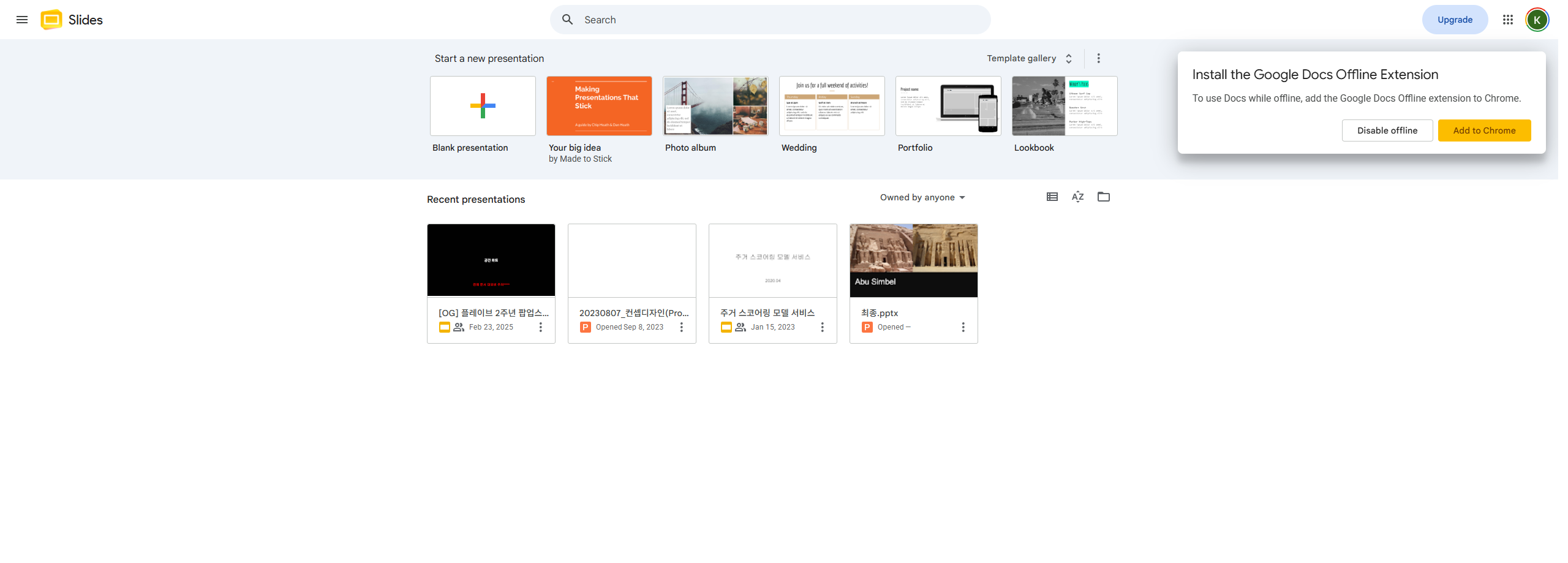
Google's help page gives two routes. The first is to click Presentation from the Slides start screen. I opened docs.google.com/presentation and there was nothing to click.
The home screen offered a Blank presentation and five templates. No AI entry point that I could see. I looked twice, once on the screen and once at the screenshot afterwards, and it wasn't there either time. I'll keep it to what I observed. I didn't see it on the home screen.
What worked was creating a presentation first and opening it. Inside the editor, a panel came up reading "Hello, KIM. Let's start creating." with five choices: Presentation, Slides, Templates, Import, and Blank slide. Presentation is the one that generates a whole deck. The toolbar also carries an Ask Gemini button.
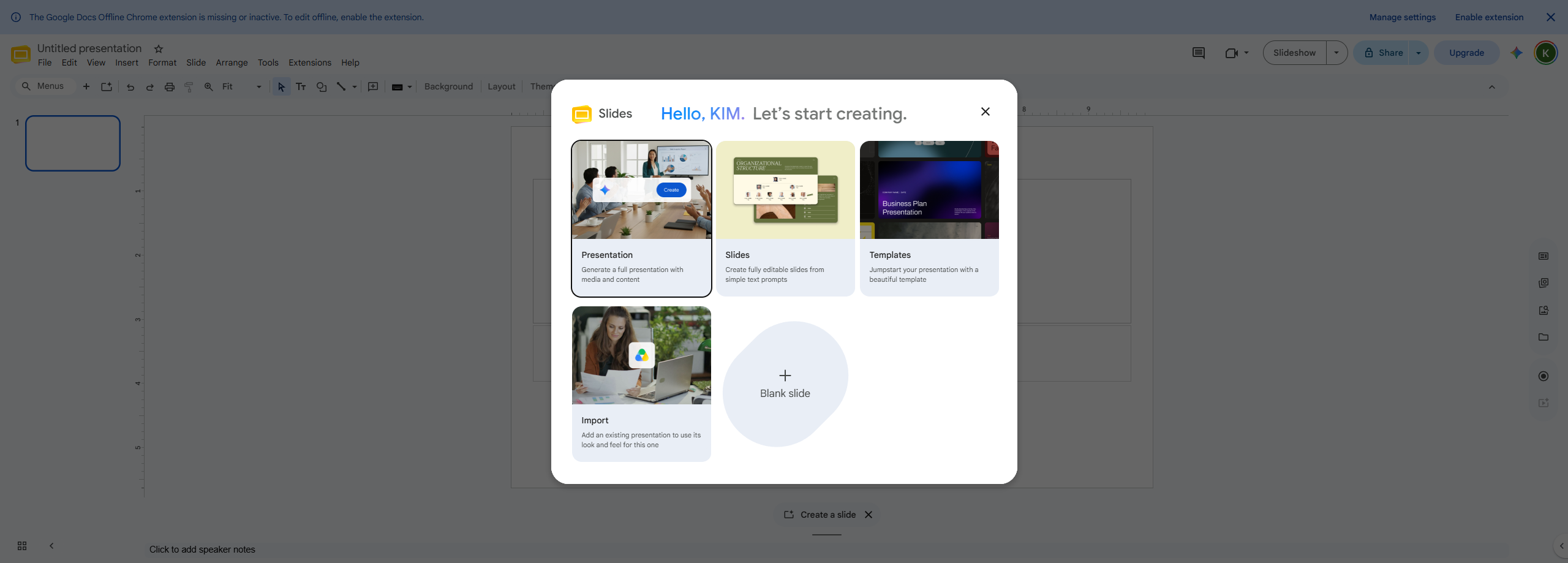
That second route is spelled out on the same help page: "In the start screen, click 'Presentation.' Or, in a blank presentation, with no existing slides, at the top right, click Ask Gemini." So the path I took was documented. What tripped me up was the first half of that sentence, because the start screen on my account had no Presentation option. If you gave up there, make an empty presentation and open it.
It interviews you before it builds anything
I expected a prompt box and a progress bar. What I got was an interview.
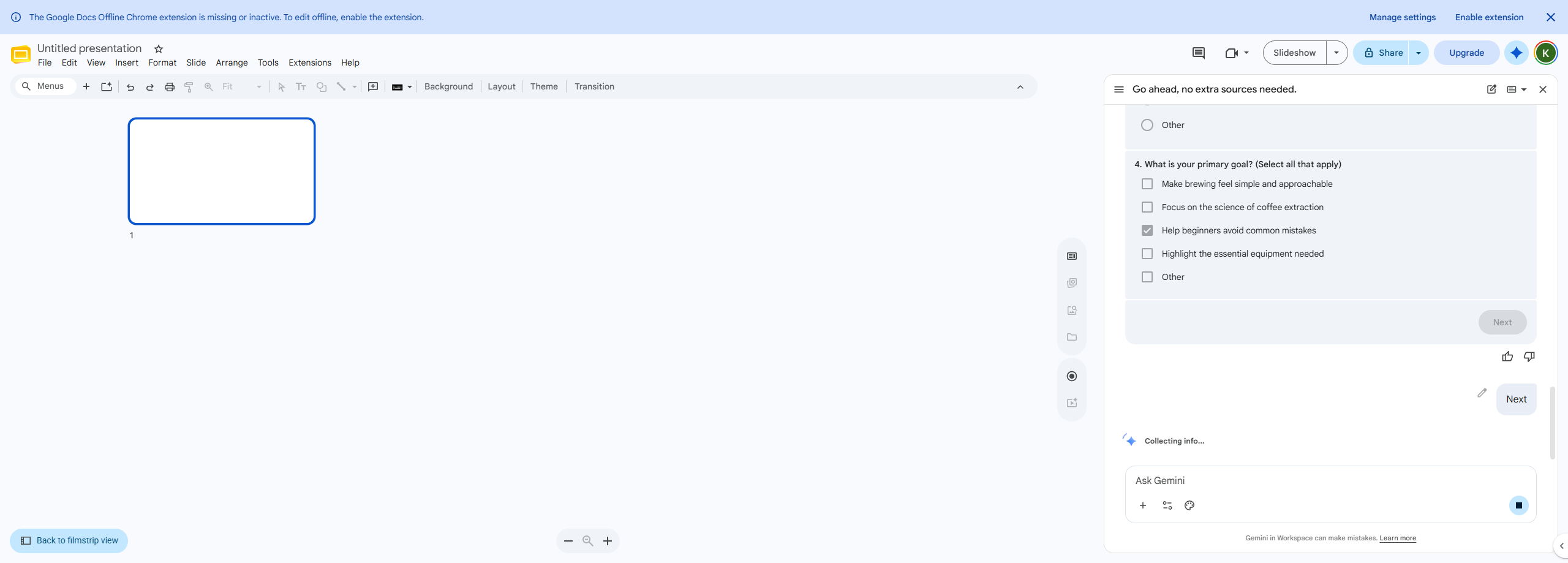
Sixty-seven seconds after I sent the prompt, Gemini came back with a questionnaire instead of slides. There were at least four questions, and I say at least because the goals question is numbered 4 in my screenshot while I only captured three of them on screen:
- Visual style. Bright and colorful / Sleek and dark / Coffee shop aesthetic / Other
- Text density. In-depth / Balanced / Concise / Other
- 4. Main goals, multiple choice. Make it feel approachable / the science of extraction / help beginners avoid mistakes / highlight the gear / Other
I picked Bright and colorful, Concise, and the beginner-mistakes goal. What each of those did to the deck is further down.
How long it took, minute by minute
The documentation says generation can take a few minutes and tells you to keep the tab open. It doesn't give a number. Here is mine, off my own clock on August 3.
| Time | What happened |
|---|---|
| 18:50:18 | Sent the prompt (second attempt) |
| 18:51:25 | The questionnaire appeared, 67 seconds later |
| 18:53:31 | Clicked Next |
| 18:54:35 | A progress line appeared in the panel |
| 18:56:18 | First slide rendered |
| 18:58:25 | Three slides rendered |
| 19:00:13 | "Your slides are ready." |
From Next to finished deck was about six minutes and forty seconds. Counting the prompt, the questions, and my own time deciding on the answers, the whole thing ran about ten minutes.
That's slow enough that there's no point sitting and watching the tab. And it's one run on one account on one day, so treat the number as a single data point.
What the three slides looked like
It named the deck on its own: Beginner's Guide to Pour-Over Coffee. Three slides, and each one used a different layout.
- Essential Gear for Pour-Over Success, bullets with an illustration
- The Secret is in the Grind Size, a three-column comparison across Sweet Spot, Too Fine, and Too Coarse
- Two Steps to a Perfect Pour, numbered steps with an illustration
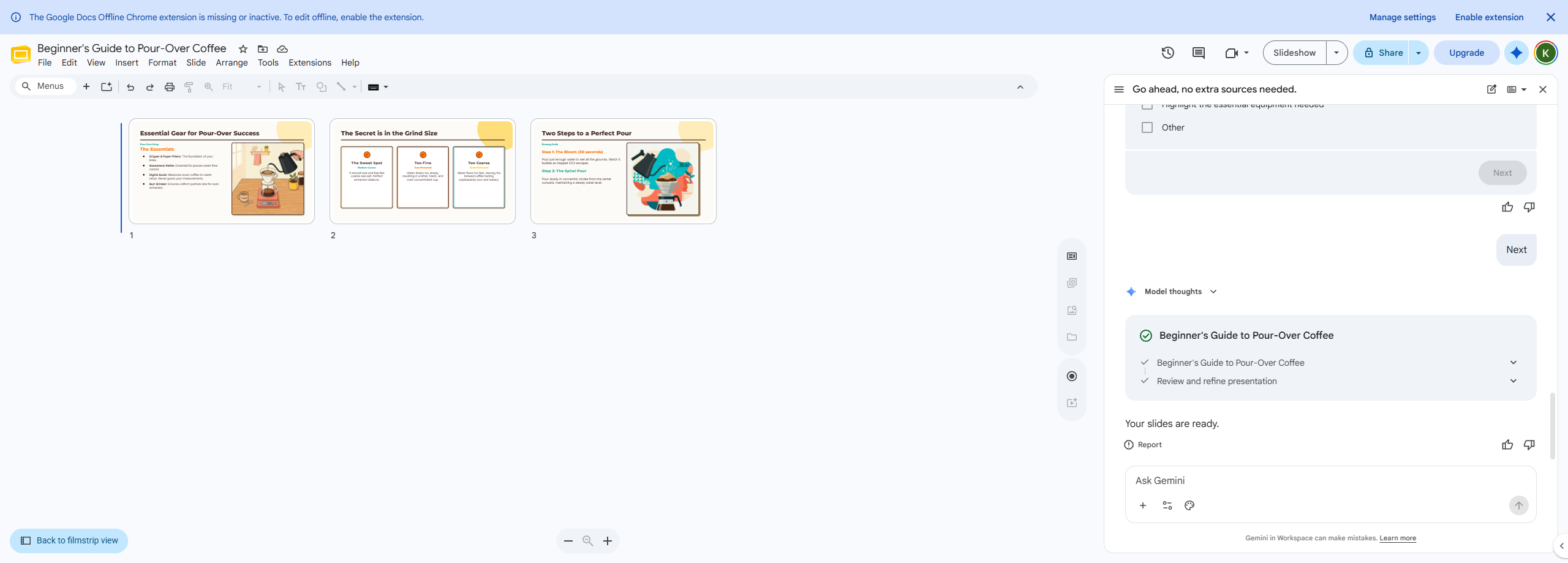
All three of my answers show up in the output. The palette is bright, the text runs short, and the middle slide is built around the two ways a beginner gets grind size wrong.
Whether it was any good is a fair question. On a topic this simple I couldn't catch it saying anything wrong, and the structure it chose matches how I would have ordered the same talk. But three slides on pour-over coffee is close to the easiest thing you could ask for, and I picked an easy topic on purpose so I could tell the tool's work apart from my own. I did not test it on anything I actually know well, so I can't tell you how it handles a subject where being slightly wrong would matter. What I can say is that it landed as a first draft, not as a finished deck.
My first prompt got refused
This is the part most walkthroughs would leave out.
Here is my first prompt, in full:
A 3-slide beginner guide to brewing pour-over coffee: gear, grind size,
and pouring technique. Keep it simple and visual.
Gemini's reply, in full:
"I can't help with that request right now. To help me get started on your presentation, could you please tell me what topic you'd like it to cover?"
Zero slides. The topic was right there in the text it had just received.
The second attempt asked for the same deck on the same topic. What changed was the shape. It opened as an instruction instead of a description, and it spelled out each slide separately as Slide 1, Slide 2, Slide 3. That one went straight into the questionnaire.
Why the first one was refused, Google never said. No error code, no policy notice, nothing in the interface. Both prompts named the same topic and both ran to two sentences, so I can't point at length or a missing subject. The phrasing is the only thing I changed, and calling that the cause would be a guess on one refusal and one success. If you get the same reply, rewriting as explicit per-slide instructions is worth trying before you conclude the feature is broken.
Free versus paid: what I could and couldn't confirm
I tried to pin down whether the free track is the same product. The answer is partly yes, and one difference is documented.
The feature docs are shared. Google's help pages describe the generation features on the same pages for both tracks, with no section explaining a difference in output or capability.
But the official access page doesn't mention the free track at all. Google's documentation on how a personal account gets these features lists Google AI Plus, Pro, and Ultra, and never names Workspace Experiments. The free path is documented on a different set of pages than the one answering how you get the feature.
Usage limits are where the two clearly diverge. Google's usage limits page has a line for paid accounts stating that with a Google AI Pro account, "You can use these features 500 times per month." That page never mentions Experiments or Labs at all. The general statement that applies to the program I'm on is that "Features are subject to usage limits," with no number attached anywhere I looked.
On the free track you use it without knowing how much you get. I never hit a limit in one session, and I don't know where the limit sits.
Two more things go in the unconfirmed column, because guessing would be worse. I did not read the terms that apply to paid personal plans, since I don't hold one and every page I could open was written for the free track, so nothing here should be read as a comparison of data handling between free and paid. And on whether the free track quietly turns into a paid one, I found no billing language and no statement promising it won't. Both directions are unconfirmed.
Business accounts run on a different contract. There is a separate document, the Google Workspace Labs for Business Terms of Service, at workspace.google.com/intl/en/terms/labs-terms.html. The personal program was renamed to Experiments; the business one still says Labs. The three phrases that matter in the personal terms below do not appear anywhere in it: human reviewers, four years, eighteen months. Those clauses are not in the business document.
What businesses do get is an admin control to opt out of data use for product improvement, which is not retroactive, and which has no equivalent on a personal account. What I could not read is the Workspace Labs Enterprise Privacy FAQ, which is behind an admin login and is where the actual business retention periods would be. So I can't tell you that human reviewers don't see business data. I can only tell you the personal clauses aren't in the business terms and that I couldn't check further.
What you agree to when you turn this on
The retention terms are on support.google.com/docs/answer/13447401, last updated March 10, 2026. Two passages, verbatim:
"Workspace Experiments Data is stored in a manner that is not associated with your Google account and will be retained for 18 months. Copies of Workspace Experiments Data that have been reviewed or annotated by human reviewers may be retained for up to 4 years."
"Your Workspace Experiments Data may also be read, rated, annotated, and reviewed by human reviewers for the purposes described above. For this reason, please do not include sensitive, confidential, or personal information that can be used to identify you or others in your prompts."
What falls inside that: the prompts I typed, any reference files I pointed it at, the deck it generated, and any feedback I sent. A person can read those as they are.
There's a second category with different handling. For what Google calls Google-selected input, meaning your own documents and mail that the system processes automatically, Google's Workspace Experiments pages say it will "aggregate and/or pseudonymize … before it is viewed by human reviewers, unless it is specifically provided as part of your feedback." That wording appears on the feature pages rather than in the retention notice quoted above, so I'm citing it separately. Be careful with the shorthand here. Saying humans read your whole Drive is too broad, and saying they only read what you typed is too narrow. Read both sentences before you decide.
Turning it off is all or nothing. There's no per-feature switch, and leaving is permanent. Google's own help pages for the program put it this way: "you'll permanently lose access to all Workspace Experiments features, and you won't be able to rejoin."
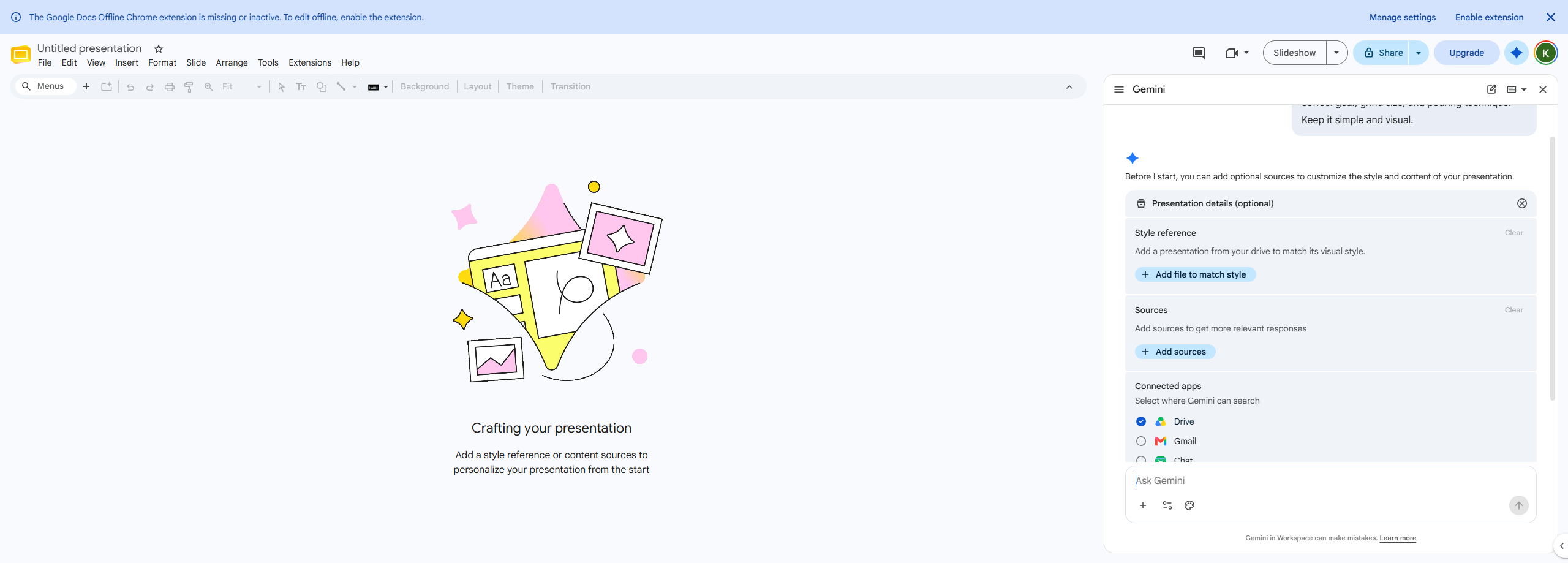
Two defaults I noticed on screen. Before generation started, a Connected apps screen asked me to select where Gemini can search, and Drive was already checked. Gmail, Chat, and Web were not.
And on the signup consent dialog, the two required boxes for the terms and for being 18 or over were empty, while the marketing email box was checked already. I unchecked it before continuing.
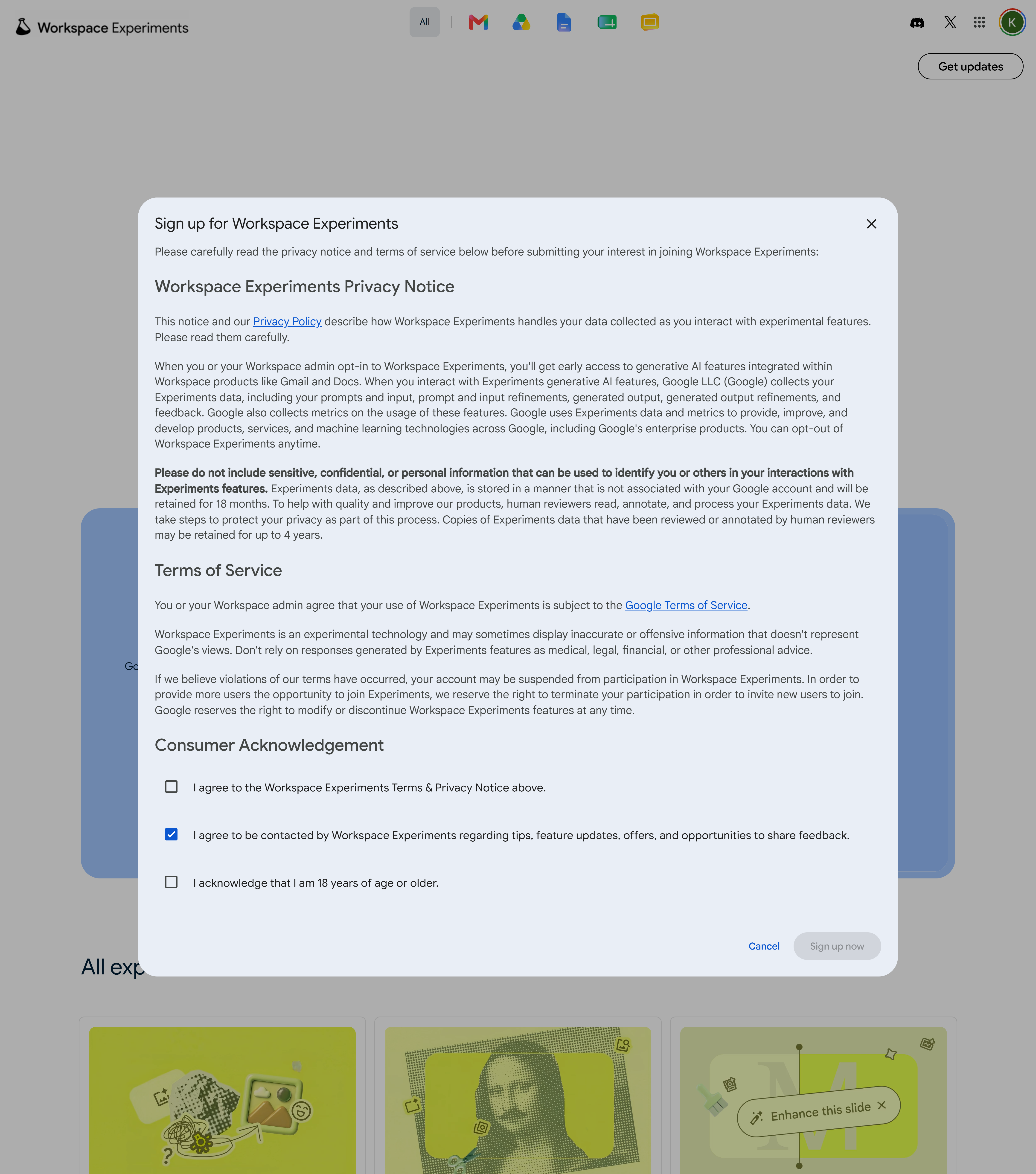
The terms also keep the door open to taking the seat back: "we reserve the right to terminate your participation in order to invite new users to join."
Where this leaves me
A free personal account generated a three-slide deck on August 3. It took about ten minutes end to end. Before generating anything it ran me through a questionnaire of at least four items, and it refused my first prompt without explaining why. The output was a usable draft on a simple topic, and I picked a simple topic on purpose.
Three things stayed out of reach for me: whether an account with no invitation email can sign up, how many generations the free track actually allows, and how business accounts are handled. The first two have no published answer I could find, and the third sits behind an admin login.
So, if your account is free and eligible: don't hunt for the button on the Slides home screen, open a presentation first. Write the prompt as instructions with each slide spelled out, and give it ten minutes rather than watching the tab. Uncheck the marketing box on the way in, and read the retention clauses before you enroll, because opting out removes every Workspace Experiments feature and Google's terms say you won't be able to rejoin.
FAQ
Can you use Google Slides AI deck generation on a free account?
My free personal account did generate a deck on August 3, 2026, through a program called Workspace Experiments. That's a separate route from the paid one. Google's own access documentation puts AI deck generation behind Business Standard and above, or Google AI Pro and Ultra, and doesn't list free accounts.
Who is excluded from Workspace Experiments?
Google's troubleshooting page states you can't use it if you have a school account or if you're not 18 or older. It also says the program is available for personal accounts in some languages and over 170 countries and territories, without naming the languages.
Where is the AI option in Google Slides?
Not on the Slides home screen, at least not on mine. The home screen showed a Blank presentation and five templates only. Create a presentation and open it, and a panel appears reading "Hello, KIM. Let's start creating." with Presentation, Slides, Templates, Import, and Blank slide. Presentation generates the full deck.
How long does Google Slides AI take to generate a deck?
On my run it was about six minutes and forty seconds from clicking Next to the line "Your slides are ready," for three slides. Counting the prompt and the questionnaire it ran me through first, roughly ten minutes total. Google's documentation only says it can take a few minutes and to keep the tab open.
Does Google review what you put into Workspace Experiments?
The terms say your Workspace Experiments Data "may also be read, rated, annotated, and reviewed by human reviewers," and that data is retained for 18 months, with human-reviewed copies retained up to 4 years. Documents and mail the system pulls in on its own are aggregated or pseudonymized before human review, unless you attach them to feedback. Opting out means leaving the whole program permanently.