Note: No affiliate links and no sponsor here. Every screen below came off my own free account, and I've marked the places where I couldn't confirm something.
I clicked Videos in the Gemini sidebar expecting a prompt box and a spinner. I got two dialogs first, and the second one had nothing to do with video. It wanted access to my Gmail, my Calendar, and my Photos.
The roundup posts skip that part. They tell you Google opened video generation to free accounts, and that the allowance was ten clips. The ten is Google's figure, and I'll come back to how little I could do to check it. None of them mention the consent screen sitting in the middle of the flow, or that you can decline it and still get your video.
Here's the run, on a free personal account, in the small hours of August 5, Korean time.
What I was working with
My account has no paid subscription on it. The Upgrade button sits in the top right of the Gemini interface on my account, which is what I'm going by, though I haven't checked what a paying account shows there. Desktop Chrome, window at 2560 by 919, going to gemini.google.com/app and clicking Videos in the left sidebar.
Two prompts actually got submitted over the course of that night. The first one finished. The second one I killed by accident. More on that below. Everything after that never got sent at all.
On timing, I'll give you the one timestamp I trust: the prompt below went out at 01:18:26.5 KST on August 5. That lands on the morning of August 4 in Pacific time, which matters for the deadline question at the end. The rest of the session sprawled past 01:50 while I broke things, so I'm not going to pretend it was a tidy five-minute window.
The first dialog: Gemini Omni
Clicking Videos doesn't drop you into a composer. A modal comes up first, headed Create videos with With Gemini Omni underneath it, essentially an introduction card for the feature.
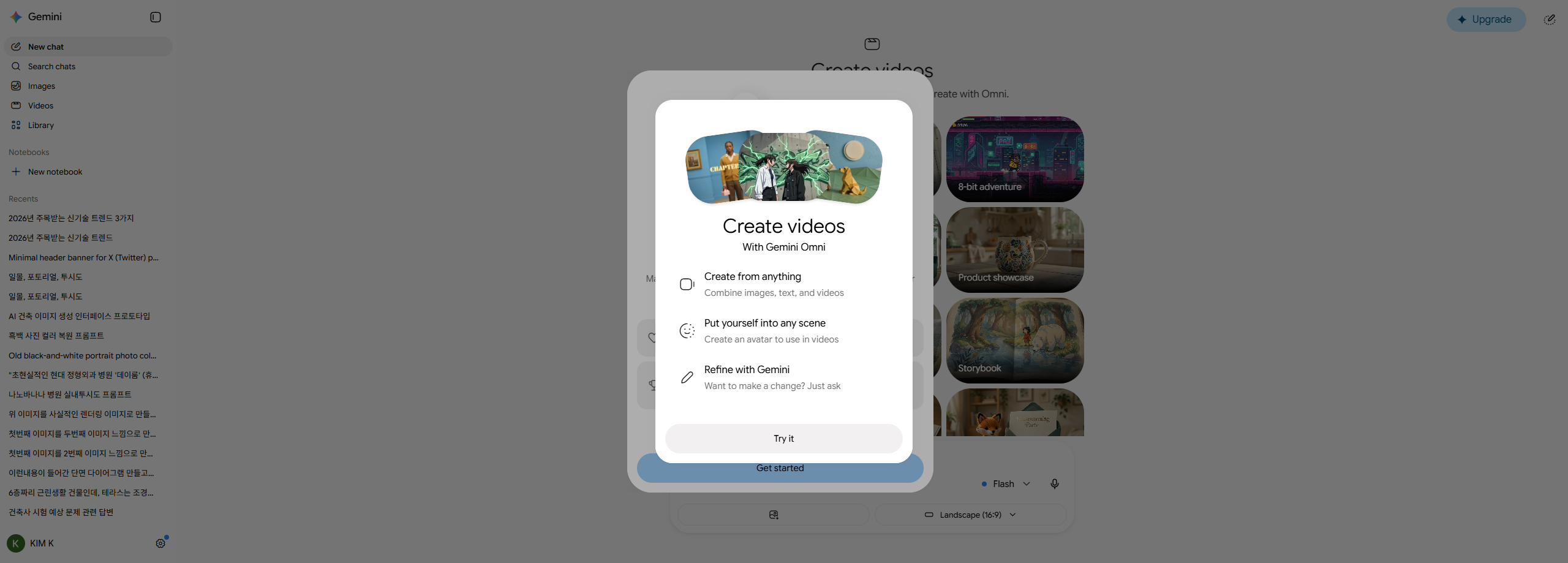
Nothing objectionable about this one. It's a splash screen, you read it or you don't, and you click through. I clicked through expecting the prompt box on the other side.
The second dialog: Gmail, Calendar, and Photos
The second modal is a different animal. It reads Supercharge Gemini with Personal Intelligence. Its body paragraph, complete, is this:
Make Gemini uniquely helpful for you by connecting more of your Google apps, all while safeguarding your info. This is a beta feature, and you can turn it off anytime.
The bold in that quote is Google's, not mine.
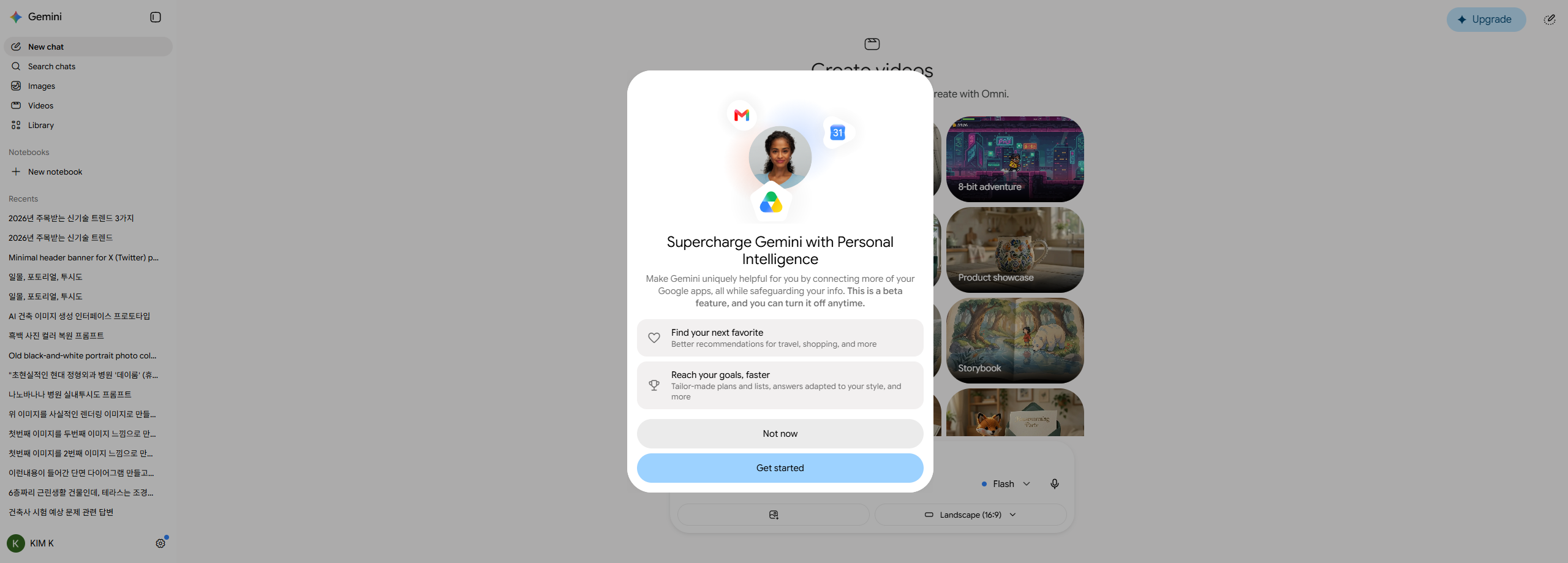
Read the request on its own terms and it's a reasonable offer. Connect your mail and your calendar, get answers that know your context. Fine.
But look at where it's standing. I came here to type a sentence about a paper boat and watch a computer draw it. Connecting my inbox does nothing for that job. The dialog sits inside the video flow and asks for something the video flow never uses.
I want to be careful about what I call this. Nobody forced anything on me. The dialog has a Not now option, it's visible, and it works. It's just badly placed. The moment you're most likely to click the bright button is the moment you want a screen gone, and this screen is sitting exactly there.
I clicked Not now, and the video generated anyway
This was the thing I actually wanted to test, because you can't learn it from reading. Declining Personal Intelligence cost me nothing. The modal closed, the Videos screen came up behind it, and everything worked.
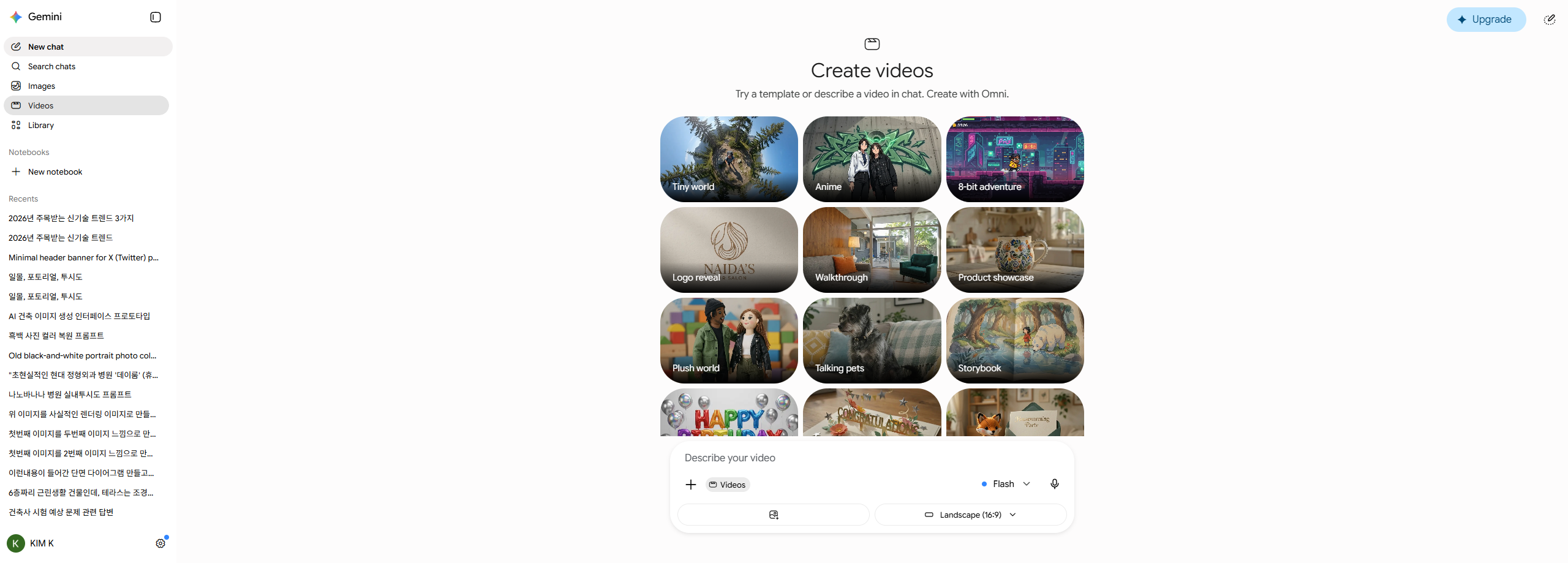
The screen behind the dialogs has two halves. Along the top, a grid of templates. Nine names are legible in my screenshot: Tiny world, Anime, 8-bit adventure, Logo reveal, Walkthrough, Product showcase, Plush world, Talking pets, and Storybook. There's a fourth row of tiles under those, but the composer overlaps their labels, so I can't tell you how many templates the section actually has.
Below that, the composer. Two settings come pre-filled, and both are worth a look before you hit generate:
| Setting | Default on my account |
|---|---|
| Model | Flash |
| Aspect ratio | Landscape (16:9) |
The picker arrived on Flash. There's a chevron next to it, so presumably something else is in that list, but I never opened it and I won't guess at what a free account is allowed to pick. Landscape 16:9 is the wrong shape for anything headed to a phone, so that second dropdown is the first thing to check if you're aiming at Shorts or Reels.
The prompt I sent, exactly as it went out
I'm printing this verbatim, including a mistake:
"A paper boat floating down a rain puddle on a city street, close-up, morning light"
The quotation marks are part of it. My input tooling passed them straight into the box, so Gemini received the opening and closing quotes as literal characters. It didn't seem to bother the model. I left them in because cleaning them up would mean showing you a prompt I never actually sent.
How long it took, with the caveat
Sent at 01:18:26.5. When I looked again at 01:20:15, it was done.
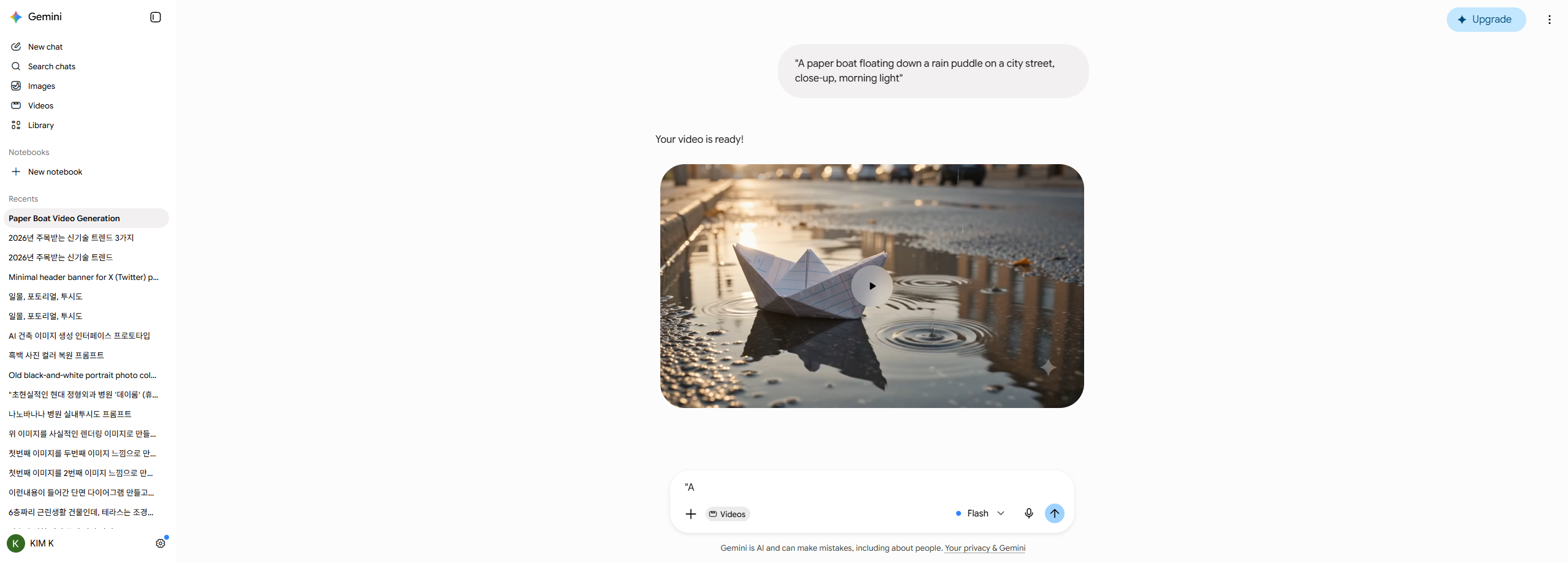
One thing about that screenshot, since I'd rather over-explain than mislead you. It isn't the 01:20:15 screen. I grabbed it later by scrolling back through the same conversation, which is why the whole exchange fits in one frame: my prompt in the bubble at top right, quotation marks and all, then Your video is ready!, then the paper boat sitting in a puddle with a play button over it. That is the result of the run I'm describing. It just isn't a photograph of the moment I first saw it.
So the honest number is under 1 minute 49 seconds. Not "1 minute 49 seconds." I waited out a 90-second timer, came back, and it was already finished, which puts the real figure somewhere below my check-in. It could have taken forty seconds. The ceiling is all I measured.
Here is the clip itself, downloaded from that conversation and dropped in untouched.
I went back and read the numbers off the player rather than guessing at them. It is 1280 by 720, 10.0 seconds, and the file that came down is 2.8 MB. So that's what a free account got me on this prompt.
What I won't do is grade the footage. One clip, on a prompt I picked for being easy to draw, with no paid-account output to hold it against. Whether ten seconds at 720p is what a paying account gets, I have no idea, because I never had one open next to it.
The ten I couldn't count
Everybody quoted the same number, including me before I sat down. Ten free videos.
That figure is attributed to Google's own account post announcing the promotion. Two things about how I got it. First, x.com wouldn't load for me directly, so I'm working from the wording as it appears in search results rather than from the post itself. Second, I went looking for the promotion in Google's official help documentation and couldn't find it described there. So what I have is a widely repeated quote, one step removed from the source.
I also have no way to check the number inside the product, and neither do you.
There's no counter on the screens I used. Not in the composer, not beside the model picker, not on the result screen. I went back through the screenshots from after I declined the dialog, and through the finished-video screen, hunting for a remaining-videos indicator, and there's nothing on any of them. I never opened a settings menu during the run, so I can't rule out that a count is filed away somewhere deeper.
That's a strange way to run a metered promotion. The one number a user needs is how many they have left, and the product doesn't show it.
Why I ended up with one finished video
I tried to burn through the allowance and find the wall myself. It went badly, and since the whole point of this post is showing you the real screen, here's the real failure.
The plan was an automated loop firing prompts one after another, twelve attempts counting the paper boat. Attempt by attempt, this is what happened.
The first one is the paper boat above. Sent, generated, finished.
The second one went out too. Its prompt was A single red maple leaf spinning slowly on still water, overhead view, take 2, and Gemini started working on it. Then I killed it myself. I was hunting for the send control, I clicked the button in that position, and while a response is in flight that button is Stop response. The screen answered with You stopped this response, no period on the end of it.
Prompts three through twelve never left the input box. My script pressed Enter to submit and Enter did not submit, so ten prompts collected in the composer while the script cheerfully logged them as sent. They did not stack up as ten tidy lines either. They ran together into one unbroken string that cuts into itself mid-word, like A single A single red maple leaf ... take 4red maA single red maple leaf ... take 6A singl. I can tell you Enter failed to send. I cannot tell you what it did instead, because nothing in my captures shows a line break.
There is a stray "A sitting in the composer in the screenshot above. I can rule one thing out: it is not the tail of that pile-up, because the pile-up text starts A single, with no quotation mark anywhere in it. Beyond that I do not know where those two characters came from. They match the opening of my first prompt, but a matching string is not a cause, and none of my captures show the moment they appeared.
The loop reported eleven successes anyway. My completion check looked for the words "video is ready" on the page, found the line left over from the first run, and called every iteration a four-second win. Eleven results, all of them the same finished video being counted again.
There's one consequence I can't resolve. The second prompt did start generating before I stopped it, and I don't know whether Google counted that against the allowance. Nothing on the screen said either way, which is the same problem as before: there's no counter to look at.
So the limit test produced one video, one aborted one, and eleven pieces of garbage data. I could have quietly repeated the ten from Google's post and moved on. So I'll keep it narrow. Google said ten, I found no way to verify it inside the product, and generation on a free account works.
About the deadline
Google's announcement put an end time on the promotion, and the reports I checked all repeat the same one: 11:59 p.m. Pacific on August 4. I'm passing that along as attribution. I didn't confirm it myself.
My run happened at 01:18 KST on August 5, which is 09:18 on August 4 in Pacific time. Inside the window, with hours to spare. If you're reading this after the cutoff, the announced allowance is over, and I can't tell you what the Videos section does now for an account with no subscription. I also don't know whether this applied to every country and every account type. I tested one account in one place.
What I'd tell you before you click Videos
The video generation works on a free account. That part is real, and it's fast enough that you won't have time to make coffee.
The thing worth knowing in advance is the shape of the flow. Two dialogs come before the prompt box, and the second asks for your Gmail, Calendar, and Photos on behalf of a feature the video composer never touches. Click Not now. Nothing breaks. Then check the aspect ratio, because it starts on landscape.
And keep your own count, because the product won't.
FAQ
Can you generate video in Gemini on a free account?
On my free personal account, yes. On August 5 KST I sent a prompt from the Videos section and got a playable clip back, with the Upgrade button still showing in the top right. Google announced the allowance as a limited-time promotion ending at 11:59 p.m. Pacific on August 4, and I haven't tested what a free account gets after that date.
Do you have to connect Gmail and Calendar to make a video?
No. The second dialog in the flow, "Supercharge Gemini with Personal Intelligence," asks to connect more of your Google apps, and it has a Not now option. I declined it and generation worked normally straight afterwards. The request is for a separate beta feature that the video composer doesn't need.
How many free videos do you actually get?
Google said ten, in a post I could only read secondhand through search results, and I found nothing about the promotion in Google's help documentation. I couldn't confirm the number, and I couldn't find any place in the interface that shows how many you have left. My attempt to exhaust the allowance failed for reasons on my end: two prompts actually got submitted, the first finished, and I cancelled the second by accident. I don't know whether that cancelled one was counted. If you're relying on the number, you're relying on Google's statement rather than anything visible in the product.
How long does Gemini take to generate a video?
Mine finished in under 1 minute 49 seconds. I sent the prompt at 01:18:26 and found it already done when I checked at 01:20:15, so that's a ceiling rather than a measurement. The actual time was somewhere below it. That's one completed generation on one account, using the default Flash model at Landscape 16:9.